

以智能体的视角看问题:我们在 Claude Code 中如何设计工具
了解 Claude Code 团队如何从模型的角度出发,设计、测试并不断迭代工具。
- Date 日期
- Reading time 阅读时间
5
min 分钟 - Copy link 复制链接
https://claude.com/blog/seeing-like-an-agent
One of the hardest parts about building an agent harness is constructing its tools.
构建智能体框架最困难的部分之一,就是设计其工具。
Claude acts completely through tool calling, but there are a number of ways tools can be constructed in the Claude API with primitives like bash, skills and code execution. (You can read more about programmatic tool calling on the Claude API in @RLanceMartin’s new article).
Claude 完全通过工具调用来执行任务,但在 Claude API 中,可以使用诸如 Bash、技能和代码执行等原语来构建多种类型的工具。(关于 Claude API 中的程序化工具调用,您可以阅读 @RLanceMartin 的新文章以了解更多信息)。
So how do you design your agents’ tools? Do you give it one general-purpose tool like bash or code execution? Or fifty specialized tools, one for each use case?
那么,您该如何设计智能体的工具呢?是给它一个通用型工具,比如 Bash 或代码执行功能?还是为每个应用场景分别配备一个专用工具,总共五十个?
To put yourself in the mind of the model, imagine being given a difficult math problem. What tools would you want in order to solve it? It would depend on your own skill set!
为了站在模型的角度思考这个问题,不妨想象一下,如果您被分配了一道难题——一道复杂的数学题,您会希望拥有哪些工具来解决它呢?这当然取决于您自身的技能水平!
Paper would be the minimum, but you’d be limited by manual calculations. A calculator would be better, but you would need to know how to operate the more advanced options. The fastest and most powerful option would be a computer, but you would have to know how to use it to write and execute code.
最基本的工具当然是纸笔,但那样只能靠手动计算,效率很低。如果有一台计算器就更好了,不过您还需要掌握如何操作其中的高级功能。而最快、最强大的选择则是使用电脑——但这就要求您懂得编写和运行代码。
This is a useful framework for designing your agent. You want to give it tools that are shaped to its own abilities. But how do you know what those abilities are? You pay attention, read its outputs, experiment. You learn to see like an agent.
这是一个设计智能体的实用框架。你应该为智能体配备与其能力相匹配的工具。但如何明确这些能力呢?你需要仔细观察、解读它的输出,并通过实验来探索。最终,你会学会像智能体一样去思考和理解。
If you’re building an agent, you’ll face the same questions we did: when to add a tool, when to remove one, and how to tell the difference. Here’s how we’ve answered them while building Claude Code, including where we got it wrong first.
如果你正在构建一个智能体,你将面临与我们同样的问题:何时添加工具、何时移除工具,以及如何做出判断。以下是我们基于 Claude Code 的开发经验给出的答案——包括我们最初犯下的错误。
Improving elicitation with the AskUserQuestion tool利用“AskUserQuestion”工具提升信息引导能力
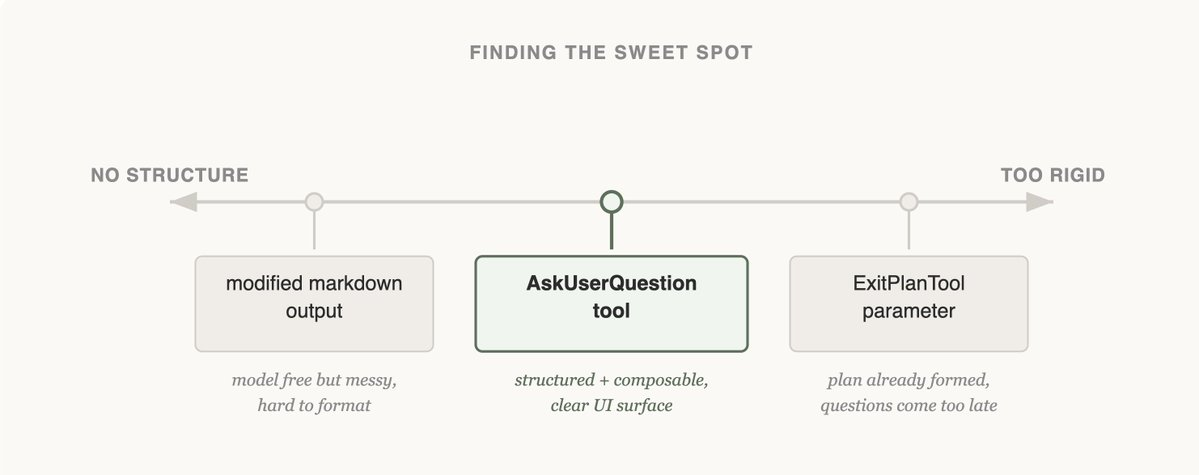
When building the AskUserQuestion tool, our goal was to improve Claude’s ability to ask questions (often called elicitation).
在构建“AskUserQuestion”工具时,我们的目标是提升 Claude 提问的能力(通常称为信息引导)。
While Claude could just ask questions in plain text, we found answering those questions felt like they took an unnecessary amount of time. How could we lower this friction and increase the bandwidth of communication between the user and Claude?
尽管 Claude 可以直接用纯文本提出问题,但我们发现回答这些问题往往耗费过多时间。那么,如何降低这种沟通障碍,从而提升用户与 Claude 之间的交流效率呢?
Attempt 1: Editing the ExitPlanTool尝试一:编辑 ExitPlanTool
The first approach we tried was adding a parameter to the ExitPlanTool to have an array of questions alongside the plan. This was the easiest fix to implement, but it confused Claude because we were simultaneously asking for a plan and a set of questions about the plan. What if the user’s answers conflicted with what the plan said? Would Claude need to call the ExitPlanTool twice? We knew this tactic wouldn’t work, so we went back to the drawing board. (You can read more about why we made an ExitPlanTool in our post on prompt caching)
我们首先尝试的方法,是在 ExitPlanTool 中添加一个参数,让工具在生成计划的同时,也返回一个问题数组。这种方案实现起来最为简单,但却让 Claude 感到困惑:因为我们同时要求它生成一份计划,以及一组关于该计划的问题。如果用户给出的答案与计划内容相冲突,该怎么办呢?Claude 是否需要调用 ExitPlanTool 两次?我们很快意识到这种方法行不通,于是重新回到设计阶段。(关于我们为何要构建 ExitPlanTool 的详细原因,请参阅我们关于提示词缓存的文章)
Attempt 2: Changing output format尝试二:调整输出格式
Next, we tried updating Claude’s output instructions to serve a slightly modified markdown format that it could use to ask questions. For example, we could ask it to output a list of bullet point questions with alternatives in brackets. We could then parse and format that question as UI for the user.
接下来,我们尝试修改 Claude 的输出指令,使其以一种稍作调整的 Markdown 格式来提出问题。例如,我们可以让它输出一个带有多选选项(用方括号标注)的项目符号列表形式的问题。随后,我们再对这些问题进行解析和格式化,以供用户界面展示。
Claude could usually produce this format, but not reliably. It would append extra sentences, drop options, or abandon the structure altogether. Onto the next approach.
Claude 通常能够生成这种格式,但并不稳定。它有时会附加额外的句子、遗漏某些选项,或者完全偏离既定结构。于是,我们转向了下一个方案。
Attempt 3: The AskUserQuestion Tool尝试 3:AskUserQuestion 工具
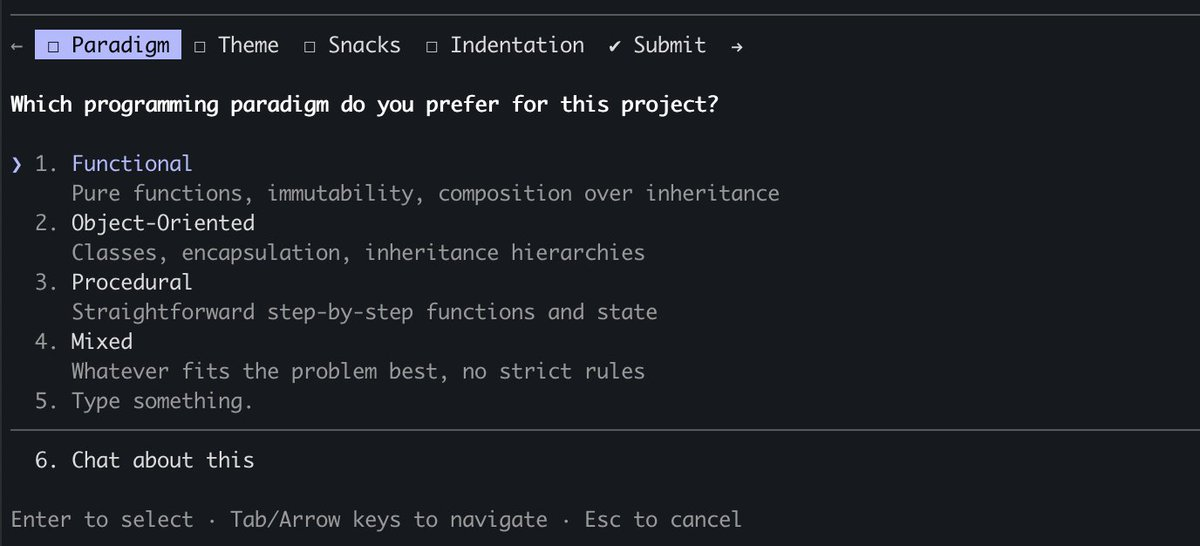
Finally, we landed on creating a tool that Claude could call at any point, but it was particularly prompted to do so during plan mode. When the tool triggered we would show a modal to display the questions and block the agent’s loop until the user answered.
最终,我们决定开发一个工具,让 Claude 可以在任何时候调用,但在规划模式下会特别被触发。当该工具被激活时,我们会弹出一个模态窗口来展示问题,并阻塞智能体的执行循环,直到用户作出回答。
This tool allowed us to prompt Claude for a structured output and it helped us ensure that Claude gave the user multiple options. It also gave users ways to compose this functionality, for example calling it in the Agent SDK or using referring to it in skills.
这个工具使我们能够引导 Claude 生成结构化的输出,并确保它为用户提供多种选择。同时,它也为用户提供了灵活的方式来使用这一功能,例如通过智能体 SDK 调用,或在技能中引用它。
Most importantly, Claude seemed to like calling this tool and we found its outputs worked well. After all, even the best designed tool doesn’t work if Claude doesn’t understand how to call it.
最重要的是,Claude 似乎很乐意调用这个工具,而且我们发现它的输出效果很好。毕竟,再精心设计的工具,如果 Claude 不知道如何调用,也发挥不了作用。
Is this the final form of elicitation in Claude Code? We doubt it. As Claude gets more capable, the tools that serve it have to evolve too. The next section shows a case where a tool that once helped started getting in the way.
这是否就是 Claude Code 中提示工程的最终形态?我们对此存疑。随着 Claude 功能的不断增强,为其提供支持的工具也必须随之进化。下一节将展示一个例子:曾经提供帮助的工具,如今却开始成为阻碍。
Updating with capabilities: tasks & todos功能更新:任务与待办事项
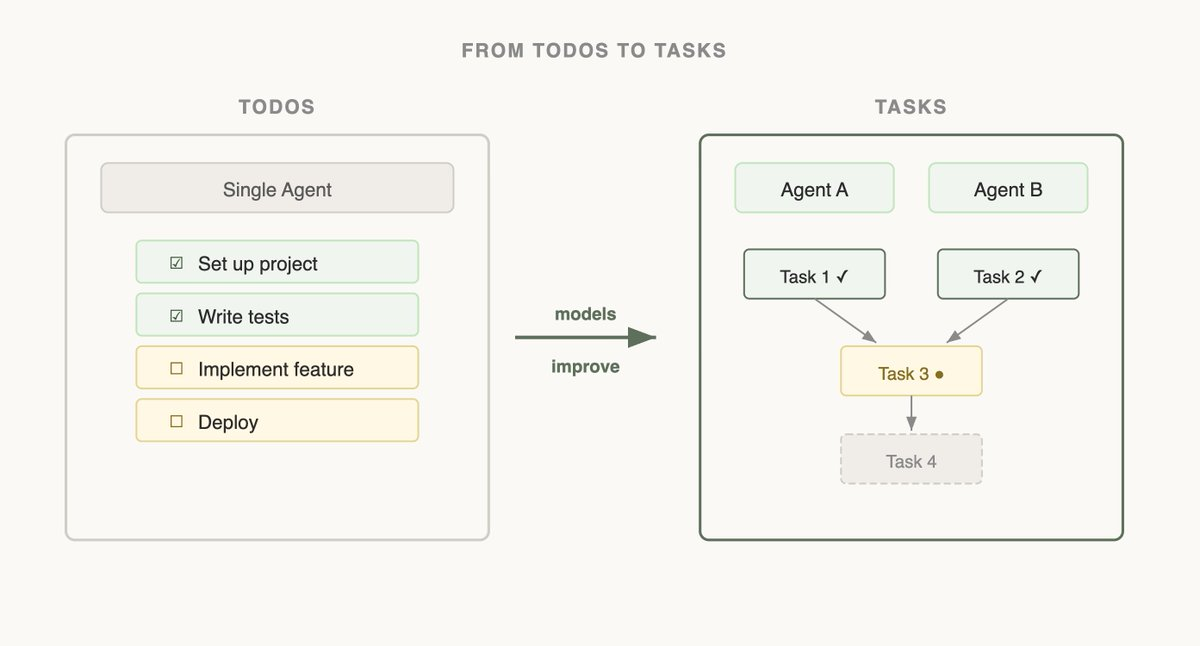
When we first launched Claude Code, we realized that the model needed a todo list to keep it on track. Todos could be written at the start and checked off as the model did work. To do this we gave Claude the TodoWrite tool, which would write or update Todos and display them to the user.
在我们首次推出 Claude Code 时,我们意识到该模型需要一个待办事项清单来确保其按计划推进。这些待办事项可以在开始时编写,并在模型完成相应工作后逐一勾选。为此,我们为 Claude 配备了 TodoWrite 工具,它可以创建或更新待办事项,并将其展示给用户。
But even then, we often saw Claude forgetting what it had to do. To adapt, we inserted system reminders every 5 turns that reminded Claude of its goal.
但即便如此,我们经常看到 Claude 会忘记自己该做什么。为了适应这种情况,我们在每 5 个回合插入一次系统提醒,以帮助 Claude 记住它的目标。
As models improved, they found To-do lists limiting. Being sent reminders of the todo list made Claude think that it had to stick to the list instead of modifying it when it realized it needed to change course. We also saw Opus 4.5 also get much better at using subagents, but how could subagents coordinate on a shared todo list?
随着模型性能的提升,人们发现待办清单变得过于局限。频繁收到待办清单的提醒会让 Claude 认为必须严格按照清单执行,而不是在意识到需要调整方向时对其进行修改。我们还观察到 Opus 4.5 在使用子代理方面有了显著进步,然而,这些子代理又如何在共享的待办清单上进行协调呢?
Seeing this, we replaced the TodoWrite feature with the Task tool. Whereas todos are focused on keeping the model on track, tasks help agents communicate with each other. Tasks could include dependencies, share updates across subagents and the model could alter and delete them.
鉴于此,我们用“任务”工具取代了原有的“待办事项写入”功能。与专注于让模型按计划推进的待办事项不同,“任务”工具更侧重于促进各智能体之间的沟通。任务可以包含依赖关系,在各个子代理之间共享更新信息,同时模型还可以对任务进行修改或删除。
As model capabilities increase, the tools that your models once needed might now be constraining them. It’s important to constantly revisit previous assumptions on what tools are needed. This is also why it’s useful to stick to a small set of models to support that have a fairly similar capabilities profile.
随着模型能力的不断提升,过去你的模型所依赖的一些工具,如今可能反而成为它们的限制因素。因此,持续回顾并重新评估之前关于所需工具的假设至关重要。这也正是为什么坚持使用一组能力水平较为接近的小型模型来提供支持会更加有效的原因。
Designing a search interface设计搜索界面
The most consequential tools we’ve built are the ones that let Claude find its own context.
我们打造的最具深远影响的工具,正是那些让 Claude 能够自主寻找上下文的工具。
When Claude Code was first released internally, we used RAG: a vector database would pre-index the codebase, and the harness would retrieve relevant snippets and hand them to Claude before each response… While RAG was powerful and fast, it required indexing and setup and could be fragile across a host of different environments. Most importantly, Claude was given this context instead of finding the context itself.
Claude Code 刚在内部发布时,我们采用了 RAG 技术:先用向量数据库对代码库进行预索引,然后在每次生成回复之前,由框架检索相关代码片段并传递给 Claude。尽管 RAG 功能强大且速度较快,但它需要预先构建索引和配置,在不同环境中也容易出现不稳定问题。更重要的是,当时是人为地为 Claude 提供上下文,而不是让它自己去发现和构建上下文。
But if Claude could search on the web, why couldn’t it also search your codebase? By giving Claude a Grep tool, we could let it search for files and build context itself.
然而,既然 Claude 能够在互联网上搜索,为什么就不能搜索你的代码库呢?通过为 Claude 提供一个 Grep 工具,我们就能让它自行查找文件、构建上下文。
As Claude gets smarter, it becomes increasingly good at building its context when given the right tools.
随着 Claude 不断进化,它在获得适当工具后,构建上下文的能力也越来越强。
When we introduced Agent Skills, we formalized the idea of progressive disclosure, which allows agents to incrementally discover relevant context through exploration.
当我们推出 Agent Skills 时,我们正式确立了渐进式披露的理念——允许智能体通过探索逐步发现并获取相关的上下文信息。
Claude could now read skill files and those files could then reference other files that the model could read recursively. In fact, a common use of skills is to add more search capabilities to Claude like giving it instructions on how to use an API or query a database.
现在,Claude 可以读取技能文件,而这些文件又可以递归地引用其他文件,使模型能够层层深入地查找所需信息。实际上,使用技能的一种常见方式,就是为 Claude 增加更多的搜索能力,比如赋予它如何调用 API 或查询数据库的指令。
Over the course of a year, Claude went from not really being able to build its own context to being able to do nested search across several layers of files to find the exact context it needed.
在整整一年的时间里,Claude 从几乎无法构建自身上下文,发展到能够跨多层文件进行嵌套式搜索,从而精准定位所需的上下文。
Progressive disclosure is now a common technique we use to add new functionality without adding a tool. In the next section, we explain why.
渐进式披露如今已成为我们常用的一种技术,它能够在不新增工具的情况下逐步引入新功能。在下一节中,我们将解释其中的原因。
Progressive disclosure: the Claude Code Guide agent渐进式披露:Claude 代码指南代理
Claude Code currently has ~20 tools, and our team frequently revisits if we need all of them for Claude to be most effective. The bar to add a new tool is high, because this gives the model one more option to think about.
目前,Claude Code 拥有约 20 种工具,我们的团队会经常评估是否真的需要全部这些工具,才能让 Claude 发挥最大效能。因为每增加一个工具,都会让模型多出一个需要考虑的选择,所以新增工具的标准一直很高。
For example, we noticed that Claude did not know enough about how to use Claude Code. If you asked it how to add a MCP or what a slash command did, it would not be able to reply.
例如,我们注意到 Claude 对如何使用 Claude Code 并不熟悉。如果你问它如何添加一个 MCP,或者斜杠命令有什么作用,它往往无法给出回答。
We could have put all of this information in the system prompt, but given that users rarely asked about this, it would have added context rot and interfered with Claude Code’s main job: writing code.
我们本来可以把这些信息都放在系统提示中,但鉴于用户很少会询问这类问题,这样做反而会导致上下文过时,并干扰 Claude Code 的核心功能——编写代码。
Instead, we tried progressive disclosure: we gave Claude a link to its docs that it could load and search when needed. This worked, but Claude would pull large chunks of documentation into context to find an answer the user could have gotten in one sentence.
于是,我们尝试了渐进式披露:给 Claude 提供了一个指向其文档的链接,让它在需要时自行加载并搜索。这种方法确实奏效,但 Claude 有时会将大段文档引入上下文中来寻找答案,而实际上用户只需一句话就能得到所需信息。
So we built the Claude Code Guide — a subagent Claude calls whenever a user asks about Claude Code itself. The subagent does the doc-searching in its own context, follows detailed instructions on how to search and what to extract, and hands back only the answer. The main agent’s context stays clean.
因此,我们构建了 Claude Code 指南——一个子代理,每当用户询问关于 Claude Code 本身的问题时,Claude 就会调用它。这个子代理会在自己的上下文中进行文档搜索,严格按照既定的搜索方法和提取内容的指示操作,最终只返回简洁的答案。这样一来,主代理的上下文始终保持简洁清晰。
While this isn’t a perfect solution (Claude can still get confused when you ask it about how to set itself up), we were able to add things to Claude’s action space without adding a new tool.
尽管这并非完美方案(当你询问如何配置 Claude 时,它仍然可能会感到困惑),但我们成功地扩展了 Claude 的行动空间,而无需新增任何工具。
Seeing like an agent is an art, not a science以智能体的视角去观察,是一门艺术,而非一门科学。
Designing the tools for your models is as much an art as it is a science. It depends heavily on the model you’re using, the goal of the agent and the environment it’s operating in.
为你的模型设计工具,既是一门科学,更是一门艺术。这在很大程度上取决于你所使用的模型、智能体的目标以及它所处的环境。
Our best advice? Experiment often, read your outputs, try new things. And most importantly, try to see like an agent.
我们最好的建议是什么?多做实验,仔细解读输出结果,勇于尝试新方法。而最重要的是,试着像智能体一样去思考和观察。
Get started with Claude Code today.
立即开始使用 Claude Code 吧。
About the author: Thariq Shihipar is a member of technical staff at Anthropic, working on Claude Code.
作者简介:Thariq Shihipar 是 Anthropic 的技术团队成员,负责 Claude Code 相关工作。
Transform how your organization operates with Claude使用 Claude 变革您组织的运营方式
Product updates, how-tos, community spotlights, and more. Delivered monthly to your inbox.
产品更新、操作指南、社区亮点等内容,每月发送至您的邮箱。